Are Your End-Users’ Passwords Compromised? Here’s How to Check

Passwords have long been used as the primary gatekeepers of digital security, yet they can also be a weak link in the chain.
The Growing Threat of Stolen Credentials
According to IBM’s 2023 Cost of a Breach report, phishing (16%) and stolen credentials (15%) are still the most common initial attack vectors for cyberattacks. Stealing and selling credentials is a lucrative business for cybercriminals – it’s not something they’ll be giving up on anytime soon.
An organization’s first step should be to tighten up its password policies and stop end-users from choosing weak and vulnerable passwords with common patterns and easily guessable phrases.
But as Specops research shows, 83% of compromised passwords actually satisfy the password length and complexity requirements of regulatory password standards.
IT teams also need a way to scan Active Directories for passwords that have become compromised – before they’re used by attackers.
Why Check for Breached Passwords?
Enforcing strong, longer passwords is crucial to help protect end-users against brute force, dictionary, and hybrid attacks. However, strong passwords can still become compromised. For example, people can be targeted with phishing attacks that trick them into giving up their credentials.
From that point on, the password is compromised until it is changed, which can often be too late – especially if the end-user or organization has no idea the initial credential theft has even occurred.
The Risks of Password Reuse
This risk is exacerbated through password reuse. Organizations can guide their employees through training and control the kinds of passwords they make at work, but they can’t stop them from reusing those passwords in their personal lives.
This is particularly problematic if the personal devices and applications they use have weak security or are accessed via unsecured networks. A Google survey found that 66% of Americans reuse their passwords across more than one online account.
Why Early Detection Matters
Without a tool to check for compromised passwords, it can take organizations a long time to discover they have a problem. IBM estimates it takes nearly a year on average to detect a breach from stolen or compromised credentials.
It’s risky to wait for end-users’ passwords to expire or to rely on spotting the early signs of an attack through other measures.
These factors all underscore the urgency of being able to discover compromised passwords within your Active Directory.
How to Find Compromised Passwords
There are manual ways to export passwords from your Active Directory and cross-reference them against publicly available lists of breached passwords. However, using a third-party tool is far quicker and easier.
And in the case of Specops Password Auditor, it’s a free tool. Specops Password Auditor is a powerful solution that can help you quickly identify and mitigate password-related vulnerabilities within your Active Directory.
Steps to Use Specops Password Auditor
Using Specops Password Auditor is straightforward. Simply download the free tool and follow these steps:
- Run Specops Password Auditor: After installation, launch Specops Password Auditor and allow it to scan your Active Directory.
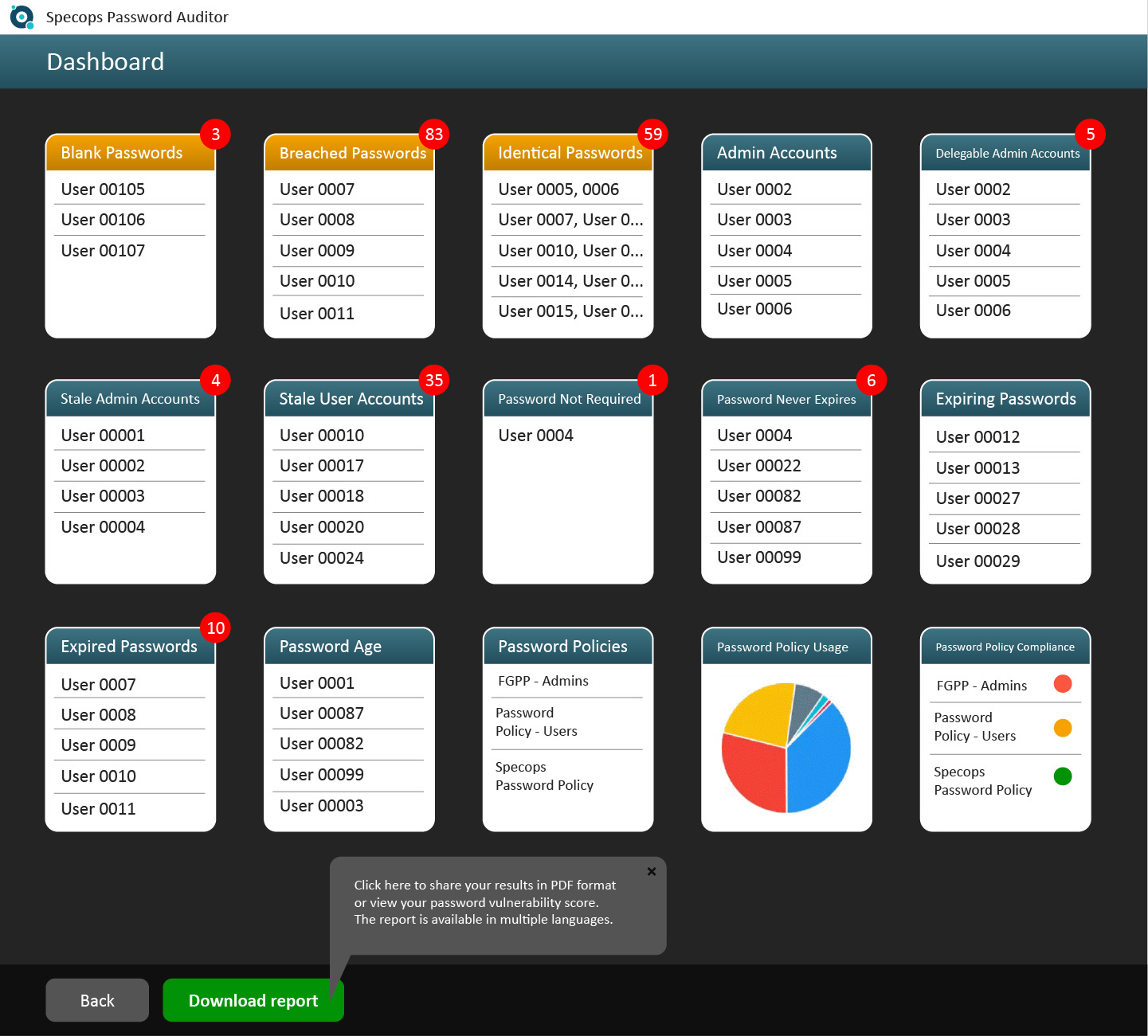
- Analyze the report: It generates comprehensive reports that highlight user and password policy information. Pay special attention to the section on accounts using compromised passwords.
- Act: Once you’ve identified compromised passwords, prompt users to change them immediately. This step is vital in preventing unauthorized access to your systems.
What Specops Password Auditor Reveals
Beyond identifying compromised passwords, Specops Password Auditor equips you with knowledge about the overall state of your password policies and user accounts, identifying blank passwords, breached passwords, identical passwords, admin accounts, delegable admin accounts, stale admin accounts, stale user accounts, user accounts with the control flag for not requiring a password set/password never expires, expired or expiring passwords, password age, and when passwords were last changed.
Armed with this information, you can make informed decisions to enhance your organization’s access security.
Automating Breached Password Checks
Specops Password Auditor offers a great initial health check of your Active Directory by cross-referencing against 950 million known compromised passwords. It helps to inform you where your password policy needs improving and where your password-related vulnerabilities lie.
The next step is building a stronger password policy and automating the process of checking for compromised passwords. This is where a more advanced tool such as Specops Password Policy comes in.
Strengthening Your Password Policy
Once you’ve identified compromised credentials and vulnerabilities using the Specops Password Auditor report, you can bolster your organization’s password security further using Specops Password Policy.
Specops Password Policy enforces password length and complexity while preventing the use of common character types at the beginning or end of passwords and consecutively repeated characters.
To facilitate the creation of stronger yet memorable passwords, it supports passphrases — a combination of words that may seem unrelated, making them both easier for users to remember and harder for hackers to decipher.
Continuous Breached Password Protection
Specops Password Policy, with its Breached Password Protection feature, checks your Active Directory against a list of 3 billion unique weak and known compromised passwords – including those being used right now in attacks on Specops’ honeypot accounts.
On top of that, if continuous scan is activated, users will be alerted by SMS or email as soon as their password has been discovered to be compromised and forced to change it. The research team’s attack monitoring data collection systems update the service daily to ensure your network is protected from real-world password attacks.
Secure Your Business Against Breached Passwords Today
Compromised credentials offer attackers an easy route into your organization – it’s too risky not to have visibility over whether your end-users have been involved in breaches.
Start boosting your access security with a free audit of your Active Directory for password-related vulnerabilities.
And if you’re interested in automating the process and securing against a constantly updated list of over 3 billion unique weak and compromised passwords, give Specops Password Policy a trial.
Sponsored and written by Specops Software.
